Content Control Using ASCX–Only UserControls With BatchCompile Turned Off

Send to Kindle

This is a bit of a painful one; I’ve inherited a “content control” system which is essentially a vast number of ascx files generated outside of the development team, outside of version control, and dumped directly onto the webservers. These did not have to be in the project because the site is configured with batch=”false”.

I had been given the requirement to implement dynamic content functionality within the controls.

These ascx files are referenced directly by a naming convention within a container aspx page to LoadControl(“~/content/somecontent.ascx”) and render within the usual surrounding master page. Although I managed to get this close to pulling them all into a document db and creating a basic CMS instead, unfortunately I found an even more basic method of using existing ascx files and allowing newer ones to have dynamic content.

An example content control might look something like:

<%@ Control  %>
<div>
<ul>
    <li>
        <span>
            <img src="http://memegenerator.net/cache/instances/250x250/8/8904/9118489.jpg" style="height:250px;width:250px;" />
            <a href="http://memegenerator.net/">Business Cat</a>
            <span class="title">&#163;19.99</span>
        </span>
    </li>
    <li>
        <span>
            <img src="http://memegenerator.net/cache/instances/250x250/8/8904/9118489.jpg" style="height:250px;width:250px;" />
            <a href="http://memegenerator.net/">Business Cat</a>
            <span class="title">&#163;19.99</span>
        </span>
    </li>
    <li>
        <span>
            <img src="http://memegenerator.net/cache/instances/250x250/8/8904/9118489.jpg" style="height:250px;width:250px;" />
            <a href="http://memegenerator.net/">Business Cat</a>
            <span class="title">&#163;19.99</span>
        </span>
    </li>
</ul>
</div>

One file, no ascx.cs (these are written outside of the development team, remember). There are a couple of thousand of them, so I couldn’t easily go through and edit them to all. How to now allow dynamic content to be injected with minimal change?

I started off with a basic little class to allow content injection to a user control:

public class Inject : System.Web.UI.UserControl
{
    public DynamicContent Data { get; set; }
}

and the class for the data itself:

public class DynamicContent
{
    public string Greeting { get; set; }
    public string Name { get; set; }
    public DateTime Stamp { get; set; }
}

Then how to allow data to be injected only into the new content files and leave the heaps of existing ones untouched (until I can complete the business case documentation for a CMS and get budget for it, that is)? This method should do it:

private System.Web.UI.Control RenderDataInjectionControl(string pathToControlToLoad, DynamicContent contentToInject)
{
    var control = LoadControl(pathToControlToLoad);
    var injectControl = control as Inject;

    if (injectControl != null)
        injectControl.Data = contentToInject;

    return injectControl ?? control;
}

Essentially, get the control, attempt to cast it to the Inject type, if the cast works inject the data and return the cast version of the control, else just return the uncast control.

Calling this with an old control would just render the old control without issues:

const string contentToLoad = "~/LoadMeAtRunTime_static.ascx";
var contentToInject = new DynamicContent { Greeting = "Hello", Name = "Dave", Stamp = DateTime.Now };

containerDiv.Controls.Add(RenderDataInjectionControl(contentToLoad, contentToInject));

232111_codecontrol_static

Now we can create a new control which can be created dynamically:

<%@ Control CodeBehind="Inject.cs" Inherits="CodeControl_POC.Inject" %>
<div>
<%=Data.Greeting %>, <%=Data.Name %><br />
It's now <%= Data.Stamp.ToString()%>
</div>

<div>
<ul>
    <li>
        <span>
            <img src="http://memegenerator.net/cache/instances/250x250/8/8904/9118489.jpg" style="height:250px;width:250px;" />
            <a href="http://memegenerator.net/">Business Cat</a>
            <span class="title">&#163;19.99</span>
        </span>
    </li>
    <li>
        <span>
            <img src="http://memegenerator.net/cache/instances/250x250/8/8904/9118489.jpg" style="height:250px;width:250px;" />
            <a href="http://memegenerator.net/">Business Cat</a>
            <span class="title">&#163;19.99</span>
        </span>
    </li>
    <li>
        <span>
            <img src="http://memegenerator.net/cache/instances/250x250/8/8904/9118489.jpg" style="height:250px;width:250px;" />
            <a href="http://memegenerator.net/">Business Cat</a>
            <span class="title">&#163;19.99</span>
        </span>
    </li>
</ul>
</div>

The key here is the top line:

<%@ Control CodeBehind="Inject.cs" Inherits="CodeControl_POC.Inject" %>

Since this now defines the type of this control to be the same as our Inject class it gives us the same thing, but with a little injected dynamic content

const string contentToLoad = "~/LoadMeAtRunTime_dynamic.ascx";
var contentToInject = new DynamicContent { Greeting = "Hello", Name = "Dave", Stamp = DateTime.Now };

containerDiv.Controls.Add(RenderDataInjectionControl(contentToLoad, contentToInject));

232111_codecontrol_dynamic

Just a little something to help work with legacy code until you can complete your study of which CMS to implement Smile

Comments welcomed.

A Quirk of Controls in ASP.Net

Send to Kindle

As part of the legacy codebase I’m working with at the moment I have recently been required to edit a product listing page to do something simple; add an extra link underneath each product.


Interestingly enough the product listing page is constructed as a collection of System.Web.UI.Controls, generating an HTML structure directly in C# which is then styled after being rendered completely flat.


For example:, each item in the listing could look a bit like this

public class CodeControl : Control 
{ 
    protected override void CreateChildControls() 
    { 
        AddSomeStuff(); 
    }

    private void AddSomeStuff() 
    { 
        var image = new Image 
        { 
            ImageUrl = "http://memegenerator.net/cache/instances/250x250/8/8904/9118489.jpg", 
            Width = 250, 
            Height = 250 
        }; 
        Controls.Add(image);

        var hyperlink = new HyperLink { NavigateUrl = "http://memegenerator.net/", Text = "Business Cat" }; 
        Controls.Add(hyperlink);

        var title = new HtmlGenericControl(); 
        title.Attributes.Add("class", "title"); 
        title.InnerText = "£19.99"; 
        Controls.Add(title); 
    } 
}


And then the code to render it would be something like:

private void PopulateContainerDiv() 
{ 
    var ul = new HtmlGenericControl("ul");

    for (var i = 0; i < 10; i++) 
    { 
        // setup html nodes 
        var item = new CodeControl(); 
        var li = new HtmlGenericControl("li");

        // every 3rd li reset ul 
        if (i % 3 == 0) ul = new HtmlGenericControl("ul");

        // add item to li 
        li.Controls.Add(item);

        // add li to ul 
        ul.Controls.Add(li);

        // add ul to div 
        containerDiv.Controls.Add(ul); 
    } 
}

The resulting HTML looks like:

<ul><li><img src="http://memegenerator.net/cache/instances/250x250/8/8904/9118489.jpg" style="height:250px;width:250px;" /><a href="http://memegenerator.net/">Business Cat</a><span class="title">&#163;19.99</span></li>
.. snip..

And the page itself:

232111_codecontrol_blank_unstyled

I’ve never seen this approach before, but it does make sense; define the content, not the presentation. Then to make it look nicer we’ve got some css to arrange the list items and their content, something like:

ul { list-style:none; overflow: hidden; float: none; }
li { padding-bottom: 20px; float: left; }
a, .title { display: block; }

Which results in the page looking a bit more like

232111_codecontrol_blank_styled


So that’s enough background on the existing page. I was (incorrectly, with hindsight, but that’s why we make mistakes right? How else would we learn? *ahem*..) attempting to implement a change that wrapped the contents of each li in a tag so that some jQuery could pick up the contents of that li and put them somewhere else on the page when a click was registered within the li.

So I did this:

// setup html nodes
var item = new CodeControl();
var li = new HtmlGenericControl("li");
var form = new HtmlGenericControl("form");

// every 3rd li reset ul
if (i % 3 == 0) ul = new HtmlGenericControl("ul");

// add item to form
form.Controls.Add(item);

// add form to li
li.Controls.Add(form);

// add li to ul
ul.Controls.Add(li);

// add ul to div
containerDiv.Controls.Add(ul);

I added in a <form> tag and put the control in there, then put the form in the li and the li in the ul. However, this resulted in the following HTML being rendered:

232111_codecontrol_elem_form

Eh? Why does the first <li> not have a <form> in there but the rest of them do? After loads of digging around my code and debugging I just tried something a bit random and changed it from a <form> to a <span>:

// setup html nodes
var item = new CodeControl();
var li = new HtmlGenericControl("li");
var wrapper = new HtmlGenericControl("span");

// every 3rd li reset ul
if (i % 3 == 0) ul = new HtmlGenericControl("ul");

// add item to form
wrapper.Controls.Add(item);

// add form to li
li.Controls.Add(wrapper);

// add li to ul
ul.Controls.Add(li);

// add ul to div
containerDiv.Controls.Add(ul);

Resulting in this HTML:

232111_codecontrol_elem_span

Wha? So if I use a <span> all is good and a <form> kills the first one? I don’t get it. I still don’t get it, and I’ve not had time to dig into it. in the end I just altered the jQuery to look for closest(‘span’) instead of closest(‘form’) and everything was peachy.


If anyone knows why this might happen, please do comment. It’s bugging me.

London Buses and The Javascript Geolocation API

Send to Kindle

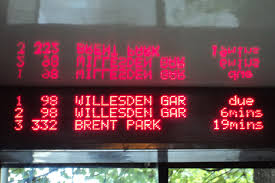
The wonderful people at Transport For London (TFL) recently released (but didn’t seem to publicise) a new page on their site that would give you a countdown listing of buses due to arrive at any given stop in London.

This is the physical one (which only appears on some bus stops):
And this is the website one, as found at countdown.tfl.gov.uk
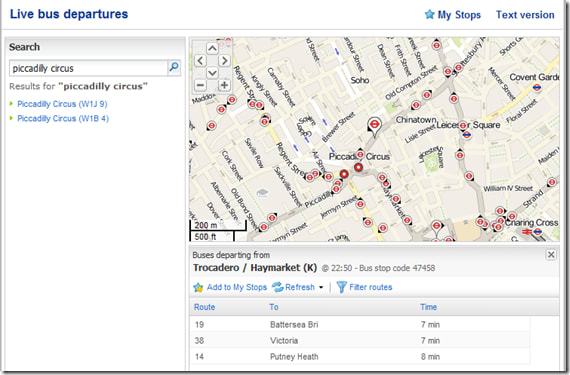
countdown

Before I continue with the technical blithering, I’d like quantify how useful this information is by way of a use case: you’re in a pub/bar/club, a little worse for wear, the tubes have stopped running, no cash for a cab, it’s raining, no jacket. You can see a bus stop from a window, but you’ve no idea how long you’d have to wait in the rain before your cheap ride home arrived. IF ONLY this information were freely available online so you can check if you have time for another drink/comfort break/say your goodbyes before a short stroll to hail the arriving transport.

With this in mind I decided to create a mobile friendly version of the page.

If you visit the tfl site (above) and fire up fiddler you can see that the request for stops near you hits one webservice which returns json data,
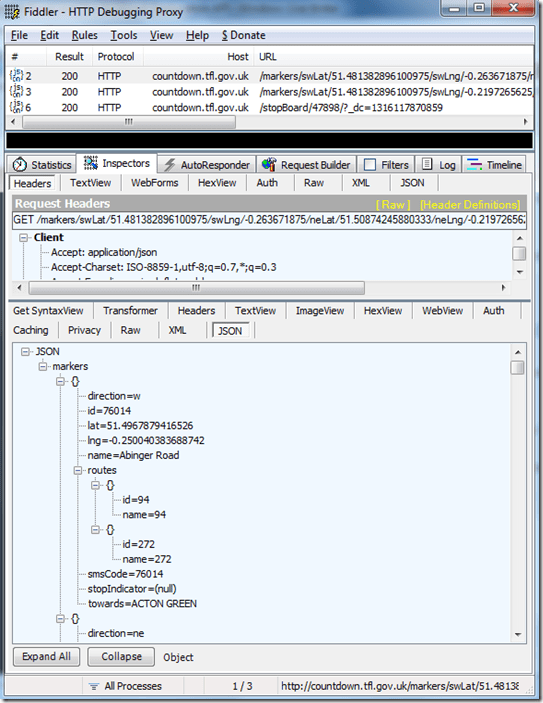
fiddler_tfl_countdown_1

and then when you select a stop there’s another call to another endpoint which returns json data for the buses due at that stop:
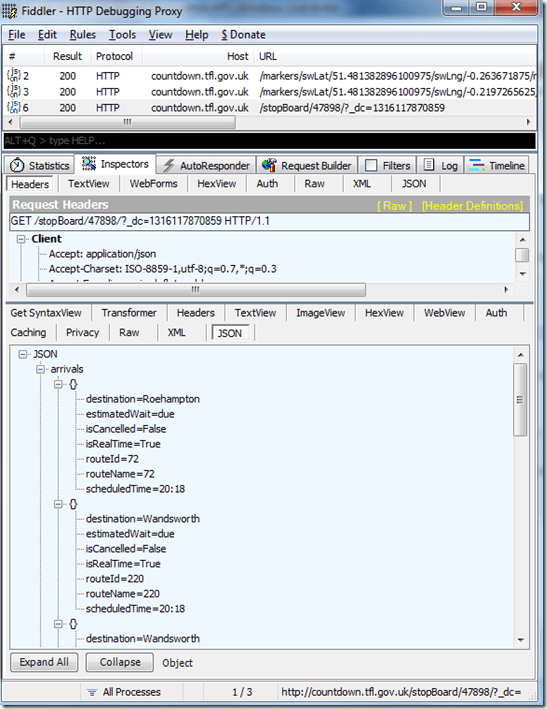
fiddler_tfl_countdown_2

Seems easy enough. However, the structure of the requests which follow on from a search for, say, the postcode starting with “W6” is a bit tricky:

http://countdown.tfl.gov.uk/markers/swLat/51.481382896100975/swLng/-0.263671875/neLat/51.50874245880333/neLng/-0.2197265625/?_dc=1315778608026

That doesn’t say something easy like “the postcode W6”, does it? It says “these exact coordinates on the planet Earth”.

So how do I emulate that? Enter JAVASCRIPT’S NAVIGATOR.GEOLOCATION!

Have you ever visited a page or opened an app on your phone and saw a popup asking for your permission to share your location with the page/app? Something like:
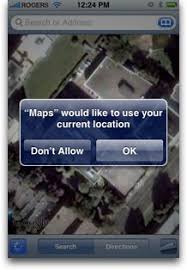
Or in your browser:

image

This is quite possibly the app attempting to utilise the javascript geolocation API in order to try and work out your latitude and longitudinal position.

This information can be easily accessed by browsers which support the javascript navigator.geolocation API. Even though the API spec is only a year old, diveintohtml5 point out it’s actually currently supported on quite a few browsers, including the main mobile ones.

The lat and long can be gleaned from the method

navigator.geolocation.getCurrentPosition

which just takes a callback function as a parameter passing a “position” object e.g.

navigator.geolocation.getCurrentPosition(showMap);

function show_map(position) {
      var latitude = position.coords.latitude;
      var longitude = position.coords.longitude;
      // let's show a map or do something interesting!
}

Using something similar to this we can pad the single position to create a small area instead, which we pass to the first endpoint, retrieve a listing of bus stops within that area, allow the user to select one, pass that stop ID as a parameter to the second endpoint to retrieve a list of the buses due at that stop, and display them to the user.

My implementation is:

$(document).ready(function() {
	// get lat long
	if (navigator.geolocation){
		navigator.geolocation.getCurrentPosition(function (position) {
			getStopListingForLocation(position.coords.latitude, position.coords.longitude);
		});
	} else {
		alert('could not get your location');
	}
});

Where getStopListingForLocation is just

function getStopListingForLocation(lat, lng){
	var swLat, swLng, neLat, neLng;
	swLat = lat - 0.01;
	swLng = lng - 0.01;
	neLat = lat + 0.01;
	neLng = lng + 0.01;

	var endpoint = 'http://countdown.tfl.gov.uk/markers/swLat/' + swLat + '/swLng/' + swLng + '/neLat/' + neLat + '/neLng/' + neLng + '/';

	$.ajax({
				type: 'POST',
				url: 'Proxy.asmx/getMeTheDataFrom',
				data: "{'here':'"+endpoint+"'}",
				contentType: "application/json; charset=utf-8",
				dataType: "json",
				success: function(data) { displayStopListing(data.d); }
			});
}

The only bit that had me confused for a while was forgetting that browsers don’t like cross browser ajax requests. The data will be returned and is visible in fiddler, but the javascript (or jQuery in my case) will give a very helpful “error” error.

As such, I created the World’s Simplest Proxy:

[System.Web.Script.Services.ScriptService]
public class Proxy: System.Web.Services.WebService
{

    [WebMethod]
    public string getMeTheDataFrom(string here)
    {
        using (var response = new System.Net.WebClient())
        {
            return response.DownloadString(here);
        }
    }
}

All this does, quite obviously, is to forward a request and pass back the response, running on the server – where cross domain requests are just peachy.

Then I have a function to render the json response

function displayStopListing(stopListingData){
var data = $.parseJSON(stopListingData);
	$.each(data.markers, function(i,item){
      $("<li/>")
	  .text(item.name + ' (stop ' + item.stopIndicator + ') to ' + item.towards)
	  .attr("onclick", "getBusListingForStop(" + item.id + ")")
	  .attr("class", "stopListing")
	  .attr("id", item.id)	  
	  .appendTo("#stopListing");
    });	
}

And then retrieve and display the bus listing

function getBusListingForStop(stopId){
var endpoint = 'http://countdown.tfl.gov.uk/stopBoard/' + stopId + '/';
	
	$("#" + stopId).attr("onclick","");
 
	$.ajax({
		type: 'POST',
		url: 'Proxy.asmx/getMeTheDataFrom',
		data: "{'here':'"+endpoint+"'}",
		contentType: "application/json; charset=utf-8",
		dataType: "json",
		success: function(data) { displayBusListing(data.d, stopId); }
	});
}
 
function displayBusListing(busListingData, stopId){
	var data = $.parseJSON(busListingData);
	
  $("<h2 />").text("Buses Due").appendTo("#" + stopId);
	  
	$.each(data.arrivals, function(i,item){
	  
      $("<span/>")
	  .text(item.estimatedWait)
	  .attr("class", "busListing time")
	  .appendTo("#" + stopId);
 
      $("<span/>")
	  .text(item.routeName + ' to ' + item.destination)
	  .attr("class", "busListing info")
	  .appendTo("#" + stopId);
 
      $("<br/>")
	  .appendTo("#" + stopId);
    });	
}

(yes, my jQuery is pants. I’m working on it..)

These just need some very basic HTML to hold the output

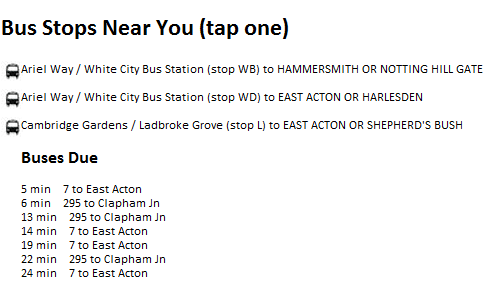
<h1>Bus Stops Near You (tap one)</h1> 
<ul id="stopListing"></ul> 

Which ends up looking like

The resultingfull HTML can be found here, the Most Basic Proxy Ever is basically listed above, but also in “full” here. If you want to see this in action head over to rposbo.apphb.com.

Next up – how this little page was pushed into the cloud in a few seconds with the wonder of AppHarbor and git.

UPDATE

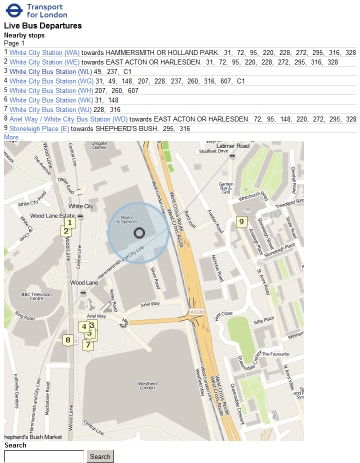
Since creation of this “app” TFL have created a very nice mobile version of their own which is much nicer than my attempt! Bookmark it at m.countdown.tfl.gov.uk :

Project: Hands-free (or as close as possible) DVD Backup

Send to Kindle


I’ve recently bought a 2TB LaCie LaCinema Classic HD Media HDD as the solution to my overly complex home media solution. The previous solution involved a networked Mac Mini hooked to the TV, streaming videos from an NSLU2 Linksys NAS (unslung, obviously) or my desktop in another room, using my laptop to VNC in to the Mac and control VLC.

Not exactly a solution my wife could easily use.

The LaCinema is a wonderful piece of kit; very simple interface, small but mighty remote control, is recognised as a media device on your network, can handle HD video, and pretty reasonable for the capacity and functionality. Plus it’s so easy to use I can throw the remote to the missus and she’ll be happy to use it.

Now comes the hard part: transferring a couple of hundred DVDs to the LaCinema internal HD. Ripping CDs is easy, since you can configure even Windows Media Player to detect a CD being inserted, access the CDDB, create the correct folders, rip the CD, even eject it when done.

Nothing comparable seems to exist for DVDs, which is extremely frustrating. You always need to have manual interaction to either specify the name of the DVD you’re ripping, the streams you want to rip, the size and format of the output video file, etc.

I can’t be arsed with all that faffing around for my sprawling DVD collection, so I thought about creating a solution.

I’ve gone for a windows service with a workflow-esque model that has the following steps:

1. Detect a DVD being inserted
2. Look up the film/series name, year, genre, related images online
3. Determine which sections and streams to rip
4. Rip to local PC
5. Move to media centre

Over the next few posts I’ll go into a bit more detail on the challenges each stage posed and the solutions I came up with. I’ll post the code online and would love for some constructive feedback!

This isn’t about me making something that everyone should look at and go “oooh, he’s so clever”, it’s about having a solution for ripping a DVD library that everyone can use and tweak to suit their own requirements. As such, help is always appreciated.

Data URI scheme

Send to Kindle

The Data URI Scheme is a method of including (potentially external) data in-line in a web page or resource.

For example, the usual method of referencing an image (which is almost always separate to the page you’ve loaded) would the one schemes of either html:

<img src="/assets/images/core/flagsprite.png" alt="flags" />

or css:

background:url(/assets/images/core/flagsprite.png)

However, this remote image (or other resource) can be base64 encoded and included directly into the html or css using the data uri schema:

<img src="data:image/png;base64,
iVBORw0KGgoAAAANSUhEUgAAAAoAAAAKCAYAAACNMs+9AAAABGdBTUEAALGP
C/xhBQAAAAlwSFlzAAALEwAACxMBAJqcGAAAAAd0SU1FB9YGARc5KB0XV+IA
AAAddEVYdENvbW1lbnQAQ3JlYXRlZCB3aXRoIFRoZSBHSU1Q72QlbgAAAF1J REFUGNO9zL0NglAAxPEfdLTs4BZM4DIO4C7OwQg2JoQ9LE1exdlYvBBeZ7jq
ch9//q1uH4TLzw4d6+ErXMMcXuHWxId3KOETnnXXV6MJpcq2MLaI97CER3N0
vr4MkhoXe0rZigAAAABJRU5ErkJggg==">

or

background:url(data:image/png;base64,
iVBORw0KGgoAAAANSUhEUgAAABAAAAAQAQMAAAAlPW0iAAAABlBMVEUAAAD/
//+l2Z/dAAAAM0lEQVR4nGP4/5/h/1+G/58ZDrAz3D/McH8yw83NDDeNGe4U
g9C9zwz3gVLMDA/A6P9/AFGGFyjOXZtQAAAAAElFTkSuQmCC

So, if you fancy cutting down on the number of HTTP requests required to load a page whilst massively increasing the size of your css and html downloads, then why not look into the data uri scheme to actually include images in your css/htm files instead of referencing them?!

Sounds crazy, but it just might work.

Using the code below you can recursively traverse a directory for css files with “url(“ image references in them, download the images, encode them, and inject the encoded image back into the css file. The idea is that this little proof of concept will allow you to see the difference in http requests versus full page download size between referencing multiple external resources (normal) and referencing fewer, bigger resources (data uri).

Have a play, why don’t you:

using System;
using System.IO;
using System.Text.RegularExpressions;
using System.Net;

namespace Data_URI
{
    class Data_URI
    {
        static void Main(string[] args)
        {
            try
            {
                var rootPath = @"D:\WebSite\";

                // css file specific stuff
                var cssExt = "*.css";
                // RegEx "url(....)"
                var cssPattern = @"url\(([a-zA-Z0-9_.\:/]*)\)";
                // new structure to replace "url(...)" with
                var cssReplacement = "url(data:{0};base64,{1})";

                // recursively get all files matching the extension specified
                foreach (var file in Directory.GetFiles(rootPath, cssExt, SearchOption.AllDirectories))
                {
                    Console.WriteLine(file + " injecting");

                    // read the file
                    var contents = File.ReadAllText(file);

                    // get the new content (with injected images)
                    // match css referenced images: "url(/blah/blah.jpg);"
                    var newContents = GetAssetDataURI(contents, cssPattern, cssReplacement);

                    // overwrite file if it's changed
                    if (newContents != contents)
                    {
                        File.WriteAllText(file, newContents);
                        Console.WriteLine(file + " injected");
                    }
                    else
                    {
                        Console.WriteLine(file + " no injecting required");
                    }
                }

                Console.WriteLine("** DONE **");
                Console.ReadKey();
            }
            catch (Exception e)
            {
                Console.WriteLine(e.Message);
                Console.ReadKey();
            }
        }

        static string GetAssetDataURI(string fileContents, string pattern, string replacement)
        {
            try
            {
                // pattern matching fun
                return Regex.Replace(fileContents, pattern, new MatchEvaluator(delegate(Match match)
                {
                    string assetUrl = match.Groups[1].ToString();

                    // check for relative paths
                    if (assetUrl.IndexOf("http://") < 0)
                        assetUrl = "http://mywebroot.example.com" + assetUrl;

                    // get the image, encode, build the new css content
                    var client = new WebClient();
                    var base64Asset = Convert.ToBase64String(client.DownloadData(assetUrl));
                    var contentType = client.ResponseHeaders["content-type"];

                    return String.Format(replacement, contentType, base64Asset);
                }));
            }
            catch (Exception)
            {
                Console.WriteLine("Error"); //usually a 404 for a badly referenced image
                return fileContents;
            }
        }
    }
}

The key lines are highlighted: they download the referenced resource, convert it to a byte array, encode that as base64, and generate the new css.

This practise probably isn’t very useful for swapping out img refs  in HTML since you lose out on browser caching and static assets cached in CDNs. It may be more useful for images referenced in CSS files, since they’re static files themselves which can be minified, pushed to CDNs, and take advantage of browser caching.

Comments welcomed.

Quick and Dirty C# Recursive Find and Replace

Send to Kindle

Say you had a vast Visual Studio solution of something ridunculous like 120+ projects and wanted to test out a few proofs of concept on improving build times.

Now say that one of the proofs of concept was to use a shared bin folder for all projects in a single solution. Editing 120+ proj files is going to make you a little crazy.

How about a little recursive find-and-replace app using regular expressions (my saviour in many menial text manipulation tasks) to do it all for you? That’d be nice, wouldn’t it? That’s what I thought too. So I just did a quick and dirty console app to do just that.

using System;
using System.Collections.Generic;
using System.Linq;
using System.Text;
using System.Text.RegularExpressions;
using System.IO;
using System.Collections.ObjectModel;

namespace RecursiveFindAndReplace
{
    class Program
    {
        static void Main(string[] args)
        {
            // where to start your directory walk
            var directoryToTraverse = @"C:\VisualStudio2010\Projects\TestSolutionWithLoadsOfProjectsInIt\";

            // what files to open
            var fileTypeToOpen = "*.csproj";

            // what to look for
            var patternToMatch = @"<OutputPath>bin\\[a-zA-Z]*\\</OutputPath>;";
            var regExp = new Regex(patternToMatch);
            // the new content
            var patternToReplace = @"<OutputPath>;C:\bin\$(Configuration)\</OutputPath>";

            // get all the files we want and loop through them
            foreach (var file in GetFiles(directoryToTraverse, fileTypeToOpen))
            {
                // open, replace, overwrite
                var contents = File.ReadAllText(file);
                var newContent = regExp.Replace(contents, patternToReplace);
                File.WriteAllText(file, newContent);
            }
        }

        // recursive method to return the files we want in all sub dirs of the initial root
        static List<string> GetFiles(string directoryPath, string extension)
        {
            var fileList = new List<string>();
            foreach (var subDir in Directory.GetDirectories(directoryPath))
            {
                fileList.AddRange(GetFiles(subDir, extension));
            }

            fileList.AddRange(Directory.GetFiles(directoryPath, extension));

            return fileList;
        }

    }
}

No doubt this could be made prettier with a little lambda, but like I said – quick and dirty.

—————–

Edit: I’ve just realised that Directory.GetFiles is inherently recursive. Duh. So the foreach instead becomes:

// get all the files we want and loop through them
foreach (var file in Directory.GetFiles(directoryToTraverse
            ,fileTypeToOpen
            ,SearchOption.AllDirectories))
{
    // open, replace, overwrite
    var contents = File.ReadAllText(file);
    var newContent = regExp.Replace(contents, patternToReplace);
    File.WriteAllText(file, newContent);
}

So that’s even quicker and slightly less dirty. Ah well.

Go back to top